This is Part 5 of Blood Work, in the subseries The Extraction. Part 4 covered what the exports contain and what they quietly leave out. This part is about getting them onto a disk I control, which is where the automation stopped.
Almost all of this project is automated. An AI agent drove the portal sessions: navigating the Sharing Hub, selecting all visits, declining the password protection, waiting out the asynchronous build, checking the Requested Records page for the release. Hours of tedious, error-prone clicking, done reliably and without complaint.
Then it reached the Download button and stopped being able to help.
Not with an error. That is the part worth writing about.
The click that registers and does nothing
The agent clicked Download. The page responded the way a page responds to a real click. No exception, no timeout, no error state anywhere in the session log.
No file arrived.
The actual transfer happens in the browser's own download machinery, one layer below the page, and the automation was not reaching it. Everything the agent could observe said success. Everything on the disk said nothing had happened.
So a human clicks Download. That is fine. It is one click, four times. What is not fine is how long it took me to establish that the click had worked, because the failure that came next was the same failure wearing better clothes.
"The download succeeded" is a claim about a browser
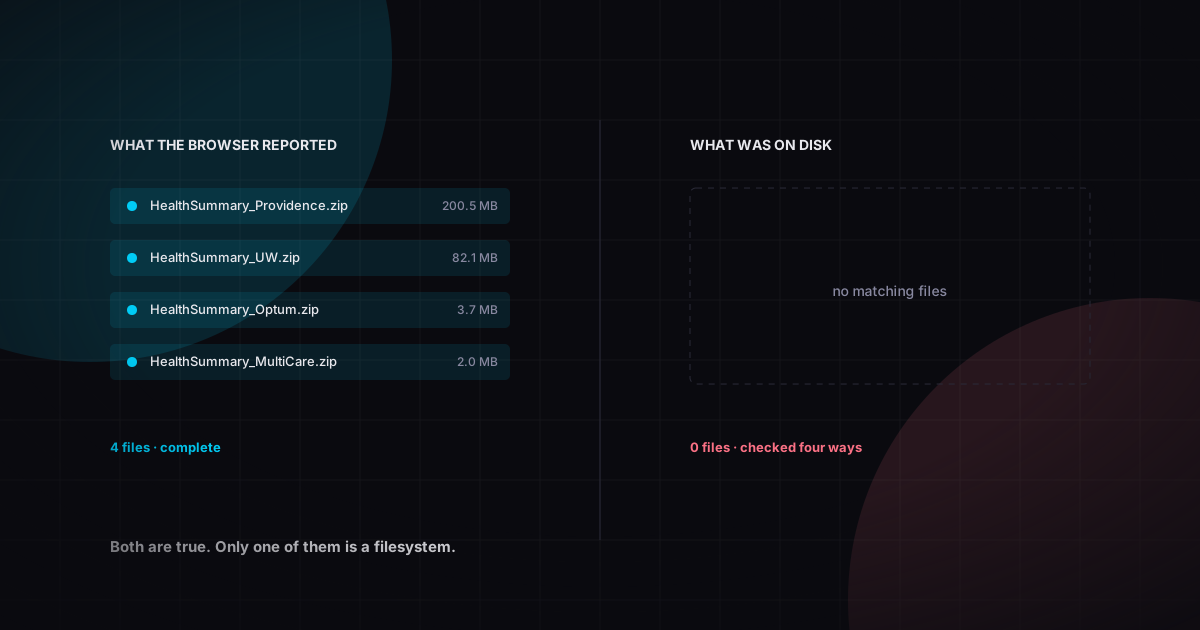
I downloaded all four exports by hand and confirmed it: four zips, sizes and timestamps, right there in the browser's downloads list. Providence 200.5 MB, Fred Hutch 82.1 MB, Optum 3.7 MB, MultiCare 2 MB. I screenshotted it. I said, out loud and in writing, that the files were in my Downloads folder.
They were not in my Downloads folder.
The agent checked four separate ways before I would believe it. A directory listing. A recursive search of the entire folder for anything matching health, summary, optum, providence, multicare, or any zip at all. A shell listing sorted by modification time. And finally a direct attempt to open the exact expected path, which came back with the file not existing rather than any kind of ambiguous silence.
The folder was demonstrably live throughout. An unrelated file written to it that same morning showed up in every one of those checks.
Chrome had been configured, at some point I do not remember, to save to a second downloads folder inside my Desktop. One mv and everything worked.
Trivial cause. Not a trivial lesson, because look at the shape of it against Part 3.
In Part 3 I declared a health system had no records because I searched my email and found nothing, and my search window started eight days after the visit. A confident negative, from a search whose bounds I never questioned.
Here I declared four files existed because a browser said so. A confident positive, from a source that was never in a position to know.
Both looked exactly like success. Neither produced an error. In both cases the thing I trusted was a report about reality rather than reality, and the distinguishing move in both cases was the same: go look at the actual thing, with a tool that has no stake in the answer.
Stat the file. If a pipeline concludes that a download completed because a UI said so, that pipeline is monitoring a UI.
Where a gigabyte of irreplaceable files should live
The exports expire in seven days. The portals they came from have already migrated once and will migrate again. Three of the seven organizations in this project have changed records systems since I became a patient. This is not data that can be re-fetched on demand.
My analysis code lives in a repository that gitignores its data directory, which is normally correct and here left the most irreplaceable artifacts in the whole project with no history and no backup.
So the raw records got their own private repository, with rules:
Nothing under raw/ is ever edited. Not to fix an encoding, not to pretty-print XML, not to strip a stray byte. Corrections belong downstream. The entire value of the archive is that it is what the institution actually sent.
One directory per acquisition, named by date, so a second export next year does not collide with this one. Inside it, original.zip exactly as downloaded and marked read-only, and extracted/ beside it, unmodified.
Every acquisition gets a manifest before it is committed: a SHA-256 for every file, plus where it came from, by what method, and on what date. A file with no provenance is barely evidence. And those hashes are what make re-importing the same export a no-op downstream rather than a duplicate, which matters more than it sounds like it does when you are reloading a dataset repeatedly while debugging a parser.
Large binaries go to Git LFS, XML stays in ordinary git. XML compresses about ten to one in a git pack, so 244 megabytes of clinical documents costs far less than it looks like it should, and keeping it diffable means an export that quietly changes between years is something I would actually see.
The bug that would have been expensive
.gitattributes is the file that tells git which paths go to LFS. Mine said:
*.zip   filter=lfs diff=lfs merge=lfs -text
*.pdf   filter=lfs diff=lfs merge=lfs -text
Epic ships 1 of 7 - My Health Summary.PDF. Uppercase.
Gitattributes patterns are case-sensitive. *.pdf does not match .PDF. Six hundred and sixty megabytes of PDF was about to go into plain git as loose objects, permanently, with rewriting history as the only way back out.
I caught it before the first commit, by accident, while checking something unrelated. The fix is to list every pattern in both cases and leave a comment explaining why, so that a future tidy-up does not helpfully remove the duplicates.
There is a small pleasure in the mirror image of this. When the same four zips were extracted independently on two different machines and hashed, all 960 files matched byte for byte. That is a better integrity check than either run alone, and it is the argument for hashing at all: not because you expect corruption, but because you want the day corruption happens to be a day you find out.
The parts that were never going to automate
It is worth being honest about how much of this project is not software.
Three sources need a records request under the HIPAA right of access, and those are letters and forms and thirty-day statutory clocks. clonoSEQ, holding the most sensitive measurement in the entire dataset, took a written request and a wait. I had a phone script ready for it: Adaptive Assist, 1-855-236-9230, two asks in a deliberate order, with prepared responses for each of the three ways I expected to be told no.
I did not need the script. The portal came through and the written request went out the same afternoon, and I want to sit with that for a second, because the good outcome is instructive.
Nobody obstructed me. Every system worked as designed. The portal exists, the request address exists, the law is clear and federal and unambiguous. And the best available outcome is that I have ten of an estimated twenty-something results, and getting the remainder requires a formal request and a month of waiting.
That is the throughline of this whole subseries. The right of access is real. Exercising it is still a form, an email, and thirty days, and no amount of automation touches any of that. What automation is good for is the tedious middle: the clicking, the parsing, the hashing, the checking of one system's claim against another's. The beginning and the end of this process are a person asking an institution for something and waiting.
What exists now
A private repository, 969 files, 983 megabytes. Four acquisitions, each with a manifest, each hash verified twice from independent extractions. Seventeen years of clinical records that no longer expire in seven days, that cannot be revoked by a portal migration, and that are byte-identical to what four institutions actually sent me.
That is the archive. It is not yet a dataset. It is 888 XML documents that do not agree with each other about anything, including what to call a CT scan.
Part 6: what was actually in them, and the number that turned out to be wrong for three days without anything complaining.
Provider and organization names appear as they appear in my records. No lab values, identifiers, or dates of service beyond those the article is about.